
smart money starts here!
From their first deposit or learning to manage a debit card, United Financial's Youth Accounts—help build healthy financial habits from an early age.
SmartStart Youth Account
Learning the value of financial planning from an early age.
SmartStart is more than a savings account—it's a financial journey designed for kids and teens. From first deposits to first debit cards, SmartStart helps young members learn, save, spend, and grow with confidence at every stage.

Why Families Love SmartStart
- Goal-based savings tools
- Real-world money management experience
- Rewards and achievement tracking
- Parent controls and account visibility
- Secure digital banking experience
Learn the value of starting early
EARN REWARDS FOR GOOD HABITS
Report Card Rewards
Good grades = Big money
Reading Rewards
Turn reading into earning with our Reading Program. Print a reading log here
Deposit Punch Cards
Get rewarded for making regular deposits when you fill up your punch card
Banzai Financial Education
Complete quick financial education courses and be rewarded.
CHECKING ACCOUNT + DEBIT CARD
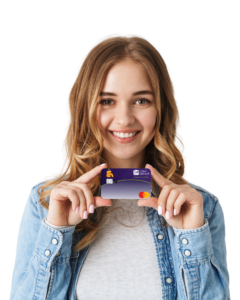
As early as age 6, members can have a checking account and debit card to gain hands-on experience managing money!
They’ll Love:
- Having their own custom debit card
- Tracking spending in the app
- Learning to budget like adults
- Setting savings goals for things they want
SmartStart Youth Certificates (CDs)
Smart Start Youth CD
Interest Rate
APY**
SmartStart Youth CD Available for members under the age of 21
Members may open a 2nd CD if joint owner has an Elite Checking Account Minimum investment of $100 and Maximum investment of $2,000
4H - FFA Certificates (CDs)
4H or FFA CD
Interest Rate
APY**
4H/FFA CD - balance is the amount of 4H or FFA check, up to $5,000
All dividends and interest are paid monthly and are based on average daily balance. There could be penalties for early withdrawal. Fees could reduce earnings
SmartStart YoutH Banking App
From saving for a goal to making smart spending choices, SmartStart gives young members the tools they need to build financial confidence for life.
- Parent Enrolls – Parents open an account for their child.
- Youth Gets the App – Youth log in to their own SmartStart banking app.
- Start Learning – Together, you can track spending, set goals, and grow savings.
- Build Confidence – Youth learn financial responsibility while parents guide the way.
{Parents - get started by adding the SmartStart card to your dashboard in your digital banking}

Free for Members
You and your child can enjoy the benefits of SmartStart— including a youth checking and savings account — at no cost

Accessible in Digital Banking
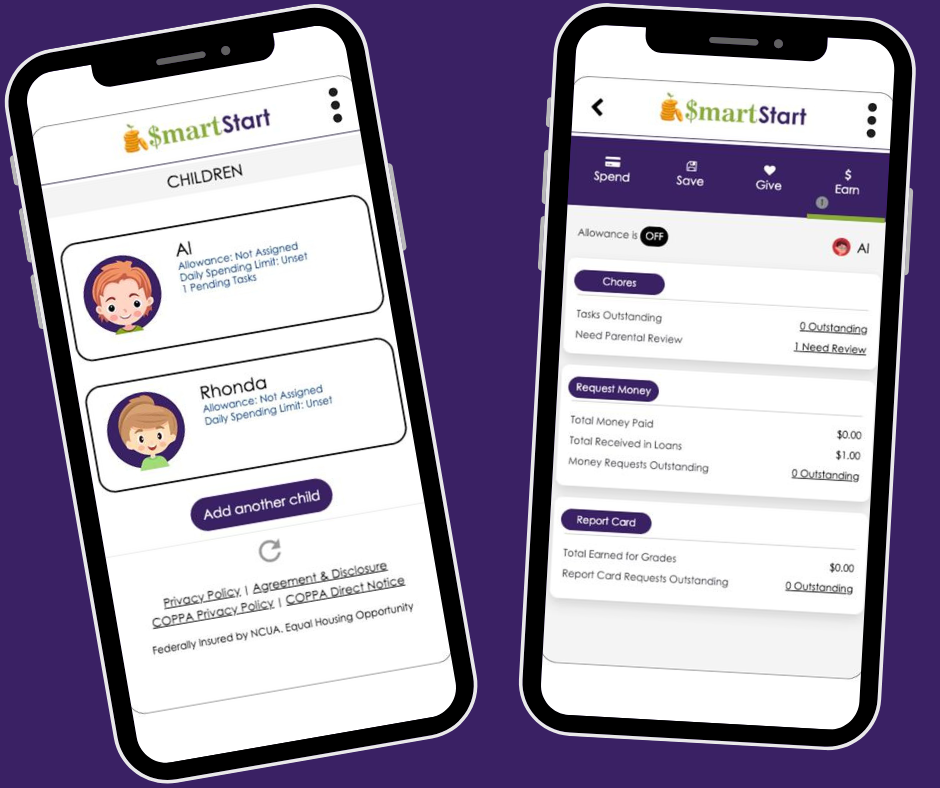
Monitor your child’s account activity, fund requests, tasks and more in online banking or on our mobile app!

Available for many ages
All minors can join the SmartStart program with a savings account. Kids ages 6–17 may also open a free checking account with a debit card, with a parent’s consent.
Card Controls
Easy to use Card Controls - Set daily spend limits and lock/unlock your child’s debit card if it’s misplaced with a few clicks.
Safe and Secure
With adult guidance, financial education, and debit card safeguards, youth can enjoy safe and secure banking

Quick and easy set up
Once your child’s account is open, you can access SmartStart online in minutes.

SmartStart Perks: Rewards for Kids
SmartStart has some great perks for kids too - plus helpful tools for mom and dad!

Earn Cash for Chores and Grades
Parents can reward their child for their achievements all in one app!

Request Money
Whether they complete a task or need spending money, your child can notify you on their United Financial mobile app.

Learn the Basics of Borrowing
Simulate borrowing by giving kids a “loan” and teaching them how repayments (and interest) work!

Gain Independence
Building financial skills today can help set your child up for a successful and confident future.

Make Financial Education Fun!
Win big! Kids can earn trophies for achievements like hitting a savings goal or paying off a loan.
Youth Account FAQs
How old does my child need to be to use SmartStart?
The SmartStart program is open to minors of any age with a Savings account at United Financial Credit Union. Minors aged 6-17 have the additional option of having a Checking account with a Debit Card.
What is required for my child(ren) and me to register for the SmartStart app?
To register for and use SmartStart, both your child and you as the parent or supervising adult on your child’s account will need to be the primary owner of a Savings account and register for your own Online Banking account access.
How do I register for SmartStart Youth Banking App?
First, register the parent/guardian:
- Log in to Online Banking or the United Financial mobile app.
- Add SmartStart card from the Organize Dashboard menu (bottom of your online banking page)
- Fill out the User Registration Detail field with your name, preferred account and phone number or email for notifications. Select Submit.
- Read and agree to the Agreement and Disclosures and the COPPA Privacy Policy, then select Submit.
Next, register the child(ren):
- Once you’ve registered, select the option to register a child.
- Enter the child’s first name as it appears on your shared account.
- Select which of your child’s accounts you’d like SmartStart to use for making transfers.
- Enter your child’s birthday.
- Select an avatar for your child, which you can change at any time. If you’d prefer to add your own photo, you can do so after registration (select the three dots in the upper right corner and Change Avatar).
- Select Submit.
If you’d like to register more children, select Submit — Add another child and repeat the steps above. There’s no limit on how many children you can register.
How do I open an account for my child?
Opening a new account for your child is exciting and oftentimes comes with many questions. We recommend visiting any one of our branches to sit with one of our new account representatives. They can answer all your questions while setting the stage for a healthy relationship between your child and their finances!
At the time of account opening, you’ll be asked to provide your child’s Social Security Number, date of birth and address, along with a current or unexpired acceptable form of ID.
Examples of an acceptable form of ID for minors:
- Driver’s license or state-issued ID
- Birth certificate
- U.S. passport or passport card
My child already has an account with United Financial. Can I use SmartStart Youth Banking App with my child?
Yes! In most cases, an existing minor account can be used to access the SmartStart Youth Banking App. If your child has an existing account and you would like to start using SmartStart parents will need to get them started following these steps.
- Parent will start the enrollment process in their Digital Banking Accounts. Add the SmartStart Youth Banking card to your digital banking dashboard.
- Within the SmartStart card in Digital Banking - start the enrollment process and register your child.
- The Child will now need to log into or enroll in Digital Banking and add the SmartStart card to their dashboard to complete the registration process.
What if I do not want my child to have access to Online Banking?
United Financial understands that choosing to give a child access to Online Banking is a decision that parents needs to be able to make based on their own comfort level and child’s ability to functionally access and properly use the program. If you prefer for your child to not have their own log in access for Online Banking, you as the parent or guardian joint owner of your child’s minor account can access the SmartStart program and the features within your online banking on their behalf.
What if there are multiple joint owners on the child’s account?
If there are multiple joint owners on a child’s account, both owners can register for SmartStart and register the child. However, the full functionality of SmartStart can only be accessed by the first parent/guardian who registered the child.
What accounts do my child and I need to have to use SmartStart Youth Banking App?
Both you and your child(ren) must have your own Savings accounts to use SmartStart's features.
What account types can be used for transactions with SmartStart?
The parent/guardian can use any of their Savings or Checking accounts for SmartStart transactions; the child will only be able to use a Savings and/or Checking account.
How do I change the accounts linked to SmartStart for myself and my child?
To change the parent’s/guardian’s linked account:
- Log in to your Digital Banking
- Access your SmartStart card
- In the SmartStart window, select the settings wheel in the upper left corner of the page.
- Select Change associated parent account.
- Choose your preferred transfer account from the drop-down list.
- Select Submit, then Yes when asked if you’re sure you want to change the associated account.
To change the child’s linked account:
- Log in to your Digital Banking (access from the parent side)
- Access your SmartStart card
- In the SmartStart window, choose the child’s profile you’ll be updating.
- Select the three dots in the upper right corner and choose Change Linked Child Account.
- Select the account you’d like your child to use for SmartStart transactions. This account will receive transfers for task completions, allowance and grade reports. Loan payments will also come out of this account.
- Select Submit, then Yes when asked if you’re sure you want to change the associated account.
I would like additional Financial Education for my Child?
Check out the Banzai teen program - Interactive financial education course for real-life money management skills.
or the Guide to Money booklet - Review the Guide to Money to learn more about checking accounts and how to easily manage your money.
What are other Youth Account perks?
Report Card Rewards - Turn in up to 2 report cards per school year. Earn up to $10 per report card from United Financial CU.
Reading Rewards - Download and print your reading log here or visit a branch to pick up a your copy. Turn in and get a coupon for a Free Junior Pizza from Hungry Howies & be entered into our quarterly drawing for a $25 Barnes and Noble Gift Card.
Deposit Punch Cards - Get rewarded for making regular deposits when you fill up your punch card. Earn $10.00 - Can turn in one punch card per quarter.
How To Videos for SmartStart
Add SmartStart to Dashboard
Set Savings Goals
Register a Child
How to Complete Chores
See how life is better when you’re a member.
PROTECTING CHILDREN’S PRIVACY ONLINE