
Welcome to SmartStart
Your money journey begins now—youth debit card, track savings, set goals & learn smart habits. Let’s get started!
What is SmartStart?
SmartStart is United Financial Credit Union’s youth banking program designed to help kids and teens learn how to manage money in a safe, fun, and parent-supported way. From saving for a goal to making smart spending choices, SmartStart gives young members the tools they need to build financial confidence for life.
Why SmartStart?
✔ Hands-On Learning – Kids get real experience managing money in their own account.
✔ Safe & Secure – Parents stay in control with built-in tools and alerts.
✔ Goal Setting – Youth can set savings goals and track their progress.
✔ Smart Spending – With a debit card (when eligible), they’ll learn how to spend wisely.
✔ Fun & Educational – Interactive tools and tips make money management exciting.
How It Works
- Parent Enrolls – Parents open an account for their child.
- Youth Gets the App – Kids log in to their own SmartStart banking app.
- Start Learning – Together, you can track spending, set goals, and grow savings.
- Build Confidence – Kids learn financial responsibility while parents guide the way.
{Parents – get started by adding the SmartStart card to your dashboard in your digital banking}
SmartStart Features
- Youth Debit Card (with parental controls)
- Savings Tracker & Goal Setting
- Money Lessons & Tips
- Safe, Secure Access 24/7

Free for Members
You and your child can enjoy the benefits of SmartStart— including a youth checking and savings account — at no cost

Accessible in Digital Banking
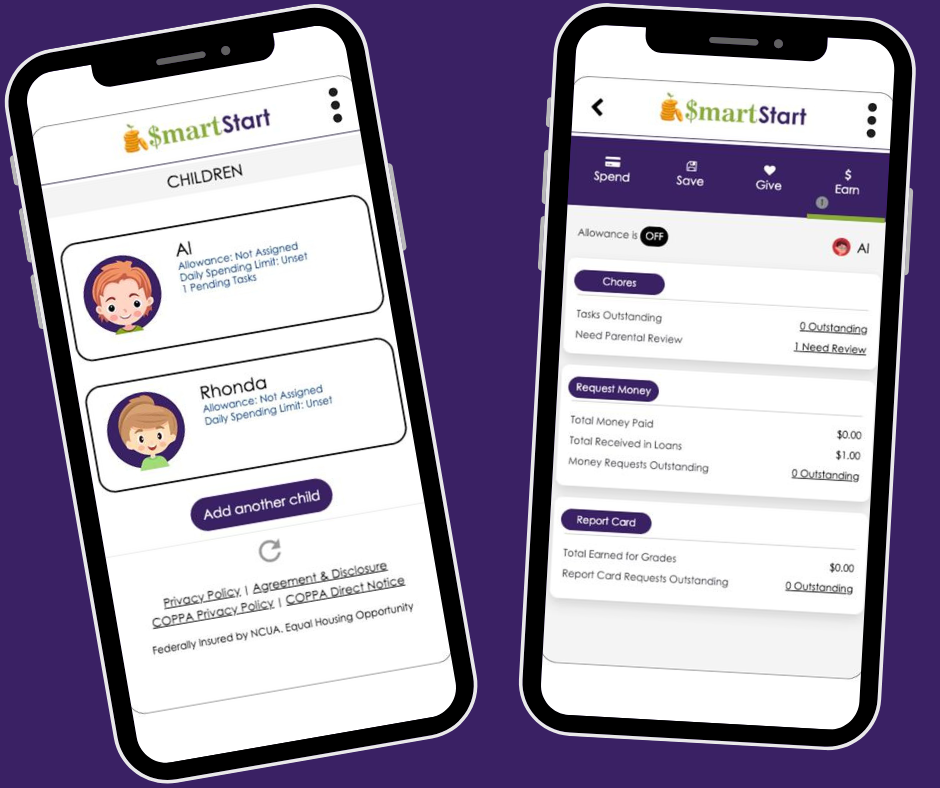
Monitor your child’s account activity, fund requests, tasks and more in online banking or on our mobile app!

Available for many ages
All minors can join the SmartStart program with a savings account. Kids ages 6–17 may also open a free checking account with a debit card, with a parent’s consent.
Card Controls
Easy to use Card Controls – Set daily spend limits and lock/unlock your child’s debit card if it’s misplaced with a few clicks.
Safe and Secure
With adult guidance, financial education, and debit card safeguards, youth can enjoy safe and secure banking

Quick and easy set up
Once your child’s account is open, you can access SmartStart online in minutes.

SmartStart Perks: Rewards for Kids
SmartStart has some great perks for kids too – plus helpful tools for mom and dad!

Earn Cash for Chores and Grades
Celebrate their achievements as they complete tasks and shine in school!

Request Money
Whether they complete a task or need spending money, your child can notify you on their United Financial mobile app.

Learn the Basics of Borrowing
Simulate borrowing by giving kids a “loan” and teaching them how repayments (and interest) work!

Gain Independence
Building financial skills today can help set your child up for a successful and confident future.

Make Financial Education Fun!
Win big! Kids can earn trophies for achievements like hitting a savings goal or paying off a loan.
How old does my child need to be to use SmartStart?
The SmartStart program is open to minors of any age with a Savings account at United Financial Credit Union. Minors aged 6-17 have the additional option of having a Checking account with a Debit Card.
What is required for my child(ren) and me to register for SmartStart?
To register for and use SmartStart, both your child and you as the parent or supervising adult on your child’s account will need to be the primary owner of a Savings account and register for your own Online Banking account access.
How do I register for SmartStart?
First, register the parent/guardian:
- Log in to Online Banking or the United Financial mobile app.
- Add SmartStart card from the Organize Dashboard menu (bottom of your online banking page)
- Fill out the User Registration Detail field with your name, preferred account and phone number or email for notifications. Select Submit.
- Read and agree to the Agreement and Disclosures and the COPPA Privacy Policy, then select Submit.
Next, register the child(ren):
- Once you’ve registered, select the option to register a child.
- Enter the child’s first name as it appears on your shared account.
- Select which of your child’s accounts you’d like SmartStart to use for making transfers.
- Enter your child’s birthday.
- Select an avatar for your child, which you can change at any time. If you’d prefer to add your own photo, you can do so after registration (select the three dots in the upper right corner and Change Avatar).
- Select Submit.
If you’d like to register more children, select Submit — Add another child and repeat the steps above. There’s no limit on how many children you can register.
How do I open an account for my child?
Opening a new account for your child is exciting and oftentimes comes with many questions. We recommend visiting any one of our branches to sit with one of our new account representatives. They can answer all your questions while setting the stage for a healthy relationship between your child and their finances!
At the time of account opening, you’ll be asked to provide your child’s Social Security Number, date of birth and address, along with a current or unexpired acceptable form of ID.
Examples of an acceptable form of ID for minors:
- Driver’s license or state-issued ID
- Birth certificate
- U.S. passport or passport card
My child already has an account with United Financial. Can I use SmartStart with my child?
Yes! In most cases, an existing minor account can be used to access the SmartStart program. If your child has an existing account and you would like to start using SmartStart parents will need to get them started following these steps.
- Parent will start the enrollment process in their Digital Banking Accounts. Add the SmartStart card to your digital banking dashboard.
- Within the SmartStart card in Digital Banking – start the enrollment process and register your child.
- The Child will now need to log into or enroll in Digital Banking and add the SmartStart card to their dashboard to complete the registration process.
What if I do not want my child to have access to Online Banking?
United Financial understands that choosing to give a child access to Online Banking is a decision that parents needs to be able to make based on their own comfort level and child’s ability to functionally access and properly use the program. If you prefer for your child to not have their own log in access for Online Banking, you as the parent or guardian joint owner of your child’s minor account can access the SmartStart program and the features within your online banking on their behalf.
What if there are multiple joint owners on the child’s account?
If there are multiple joint owners on a child’s account, both owners can register for SmartStart and register the child. However, the full functionality of SmartStart can only be accessed by the first parent/guardian who registered the child.
What accounts do my child and I need to have to use SmartStart?
Both you and your child(ren) must have your own Savings accounts to use SmartStart’s features.
What account types can be used for transactions with SmartStart?
The parent/guardian can use any of their Savings or Checking accounts for SmartStart transactions; the child will only be able to use a Savings and/or Checking account.
How do I change the accounts linked to SmartStart for myself and my child?
To change the parent’s/guardian’s linked account:
- Log in to your Digital Banking
- Access your SmartStart card
- In the SmartStart window, select the settings wheel in the upper left corner of the page.
- Select Change associated parent account.
- Choose your preferred transfer account from the drop-down list.
- Select Submit, then Yes when asked if you’re sure you want to change the associated account.
To change the child’s linked account:
- Log in to your Digital Banking (access from the parent side)
- Access your SmartStart card
- In the SmartStart window, choose the child’s profile you’ll be updating.
- Select the three dots in the upper right corner and choose Change Linked Child Account.
- Select the account you’d like your child to use for SmartStart transactions. This account will receive transfers for task completions, allowance and grade reports. Loan payments will also come out of this account.
- Select Submit, then Yes when asked if you’re sure you want to change the associated account.
How To Videos for SmartStart
Add SmartStart to Dashboard
Set Savings Goals
Register a Child
How to Complete Chores
Key Features of SmartStart

Save
Stay on track with budgeting, hit your savings goals, and build knowledge with built in financial education.

Spend
Easily track balances and purchases online to develop smart money habits.

Earn
Earn rewards for chores and good grades while discovering the benefits of hard work.